OBJECTIVE
Design a food-surplus app for India that makes rescuing good food feel as easy and as tempting as ordering it.
The goal was a reserve-and-collect experience that is:
- Exciting to browse, without hiding what you're paying for
- Clear about where, when and how to collect
- Calm and honest when payments or plans go wrong
WHAT IS GOODBITES
GoodBites connects people with bakeries, cafés, restaurants and grocers that end the day with surplus food. Partners pack what's left into discounted Surprise Bags; customers reserve, pay in the app and collect from the outlet during a pickup window.
It isn't a delivery app. The surprise is the exact mix inside the bag, never the price, category, pickup time or place.
UNDERSTANDING OUR USERS
Ananya
GOALS
- Eat well for less
- Discover new places nearby
- Know exactly when to pick up
PAIN POINTS
Mystery deals feel risky. Unsure what she's paying for or whether the outlet will still have it.
BEHAVIOUR
Browses in the evening, plans pickups on the way home, pays with UPI.
"Surprise me with the food, not the details."
Rahul
GOALS
- Recover value from unsold stock
- Avoid overselling
- Keep pickups quick at the counter
PAIN POINTS
Good food goes to waste every night. Discount apps feel complicated to manage.
BEHAVIOUR
Packs bags near closing, needs a fast way to verify orders at the counter.
"I'd rather sell it cheap than throw it out."
Meera
GOALS
- Try the app without commitment
- Feel safe paying
- Cancel easily if plans change
PAIN POINTS
Worried about payments failing or money stuck. Doesn't trust unclear refund rules.
BEHAVIOUR
Reads every line before paying. Abandons if anything feels uncertain.
"If something goes wrong, just tell me what happens to my money."
KEY PROBLEMS
Mystery Breeds Doubt
Surprise bags hide too much, so people hesitate to pay.
Pickup Confusion
Brands with several outlets make it unclear where to collect.
One Store at a Time
Reserving from two places means two separate journeys.
Payment Anxiety
UPI failures and pending states leave users unsure if they've paid.
Rigid Plans
No clear way to cancel or know when a refund will arrive.
DESIGN PRINCIPLES
Surprise the mix, not the essentials
Category, value, quantity, outlet and pickup window are always visible.
Collection first
Every screen answers where and when. Nothing implies delivery.
Honest states
Success, failure and pending each say what happened to your money.
THE JOURNEY
- 01Discover
- 02Reserve
- 03Choose outlet
- 04Pay
- 05Collect
- 06Cancel or donate
01
DISCOVER
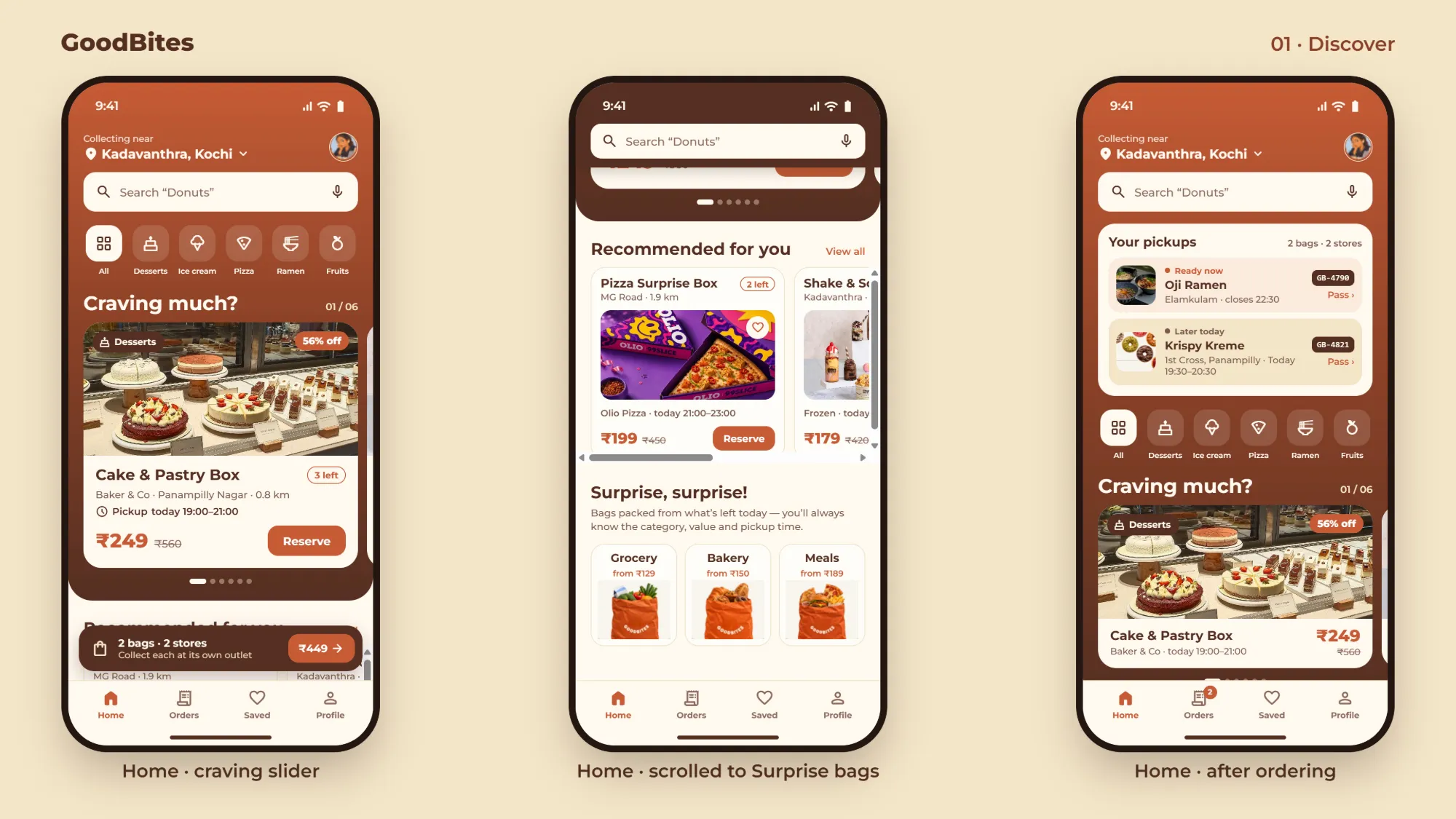
A warm, food-first home that turns leftovers into something you crave.
-
Craving slider
Big, appetising cards with discount, bags left and pickup time up front.
-
Surprise, surprise!
Grocery, Bakery and Meal bags with a "from" price, so the mystery has a frame.
-
Your pickups
After ordering, home leads with live pickups: "Ready now" and "Later today".
02
RESERVE
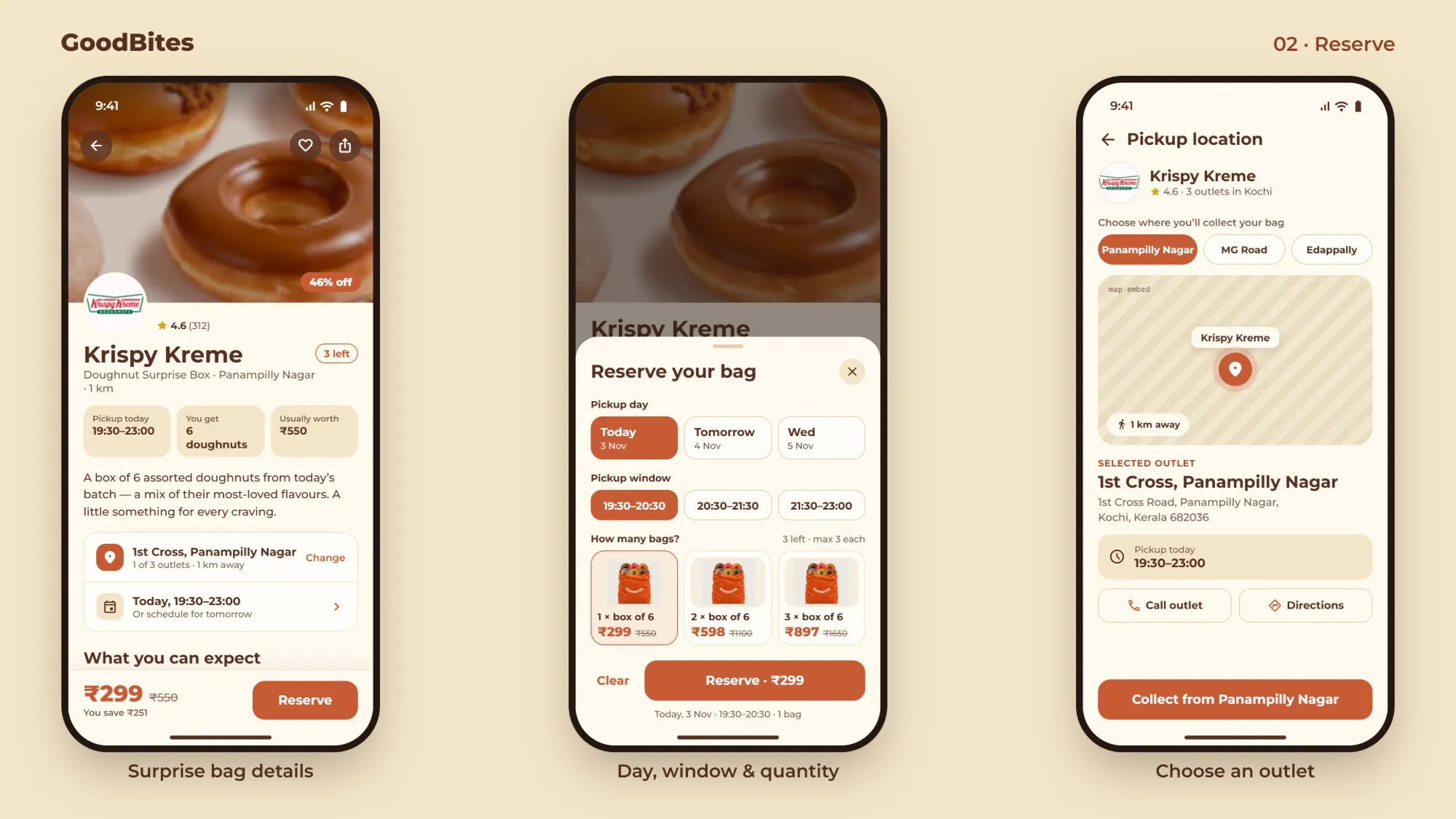
Everything you need to decide, before you commit.
-
Bag details
Pickup window, quantity and usual worth sit right under the store name.
-
Day, window & quantity
One sheet to pick when you'll come and how many boxes, with a live total.
-
Choose an outlet
Switch between a brand's outlets, see it on the map, call or get directions.
03
PAYMENT
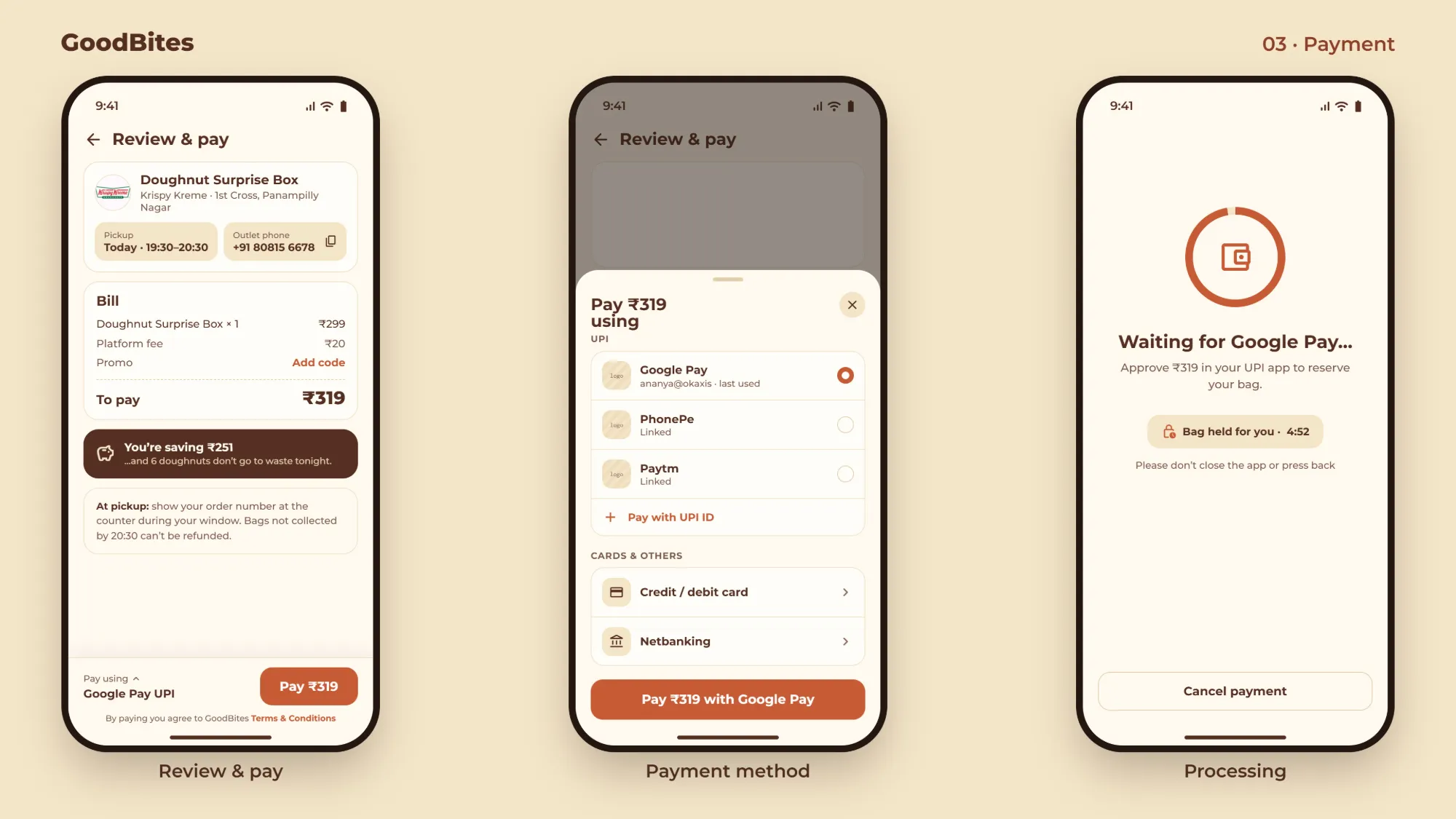
A clear bill and a bag held for you while you pay.
-
Review & pay
Pickup, outlet phone and what you save, before the Pay button.
-
UPI first
Google Pay, PhonePe and Paytm up top; cards and netbanking below.
-
Bag held for you
A countdown reassures users the bag won't vanish mid-payment.
04
PAYMENT STATES
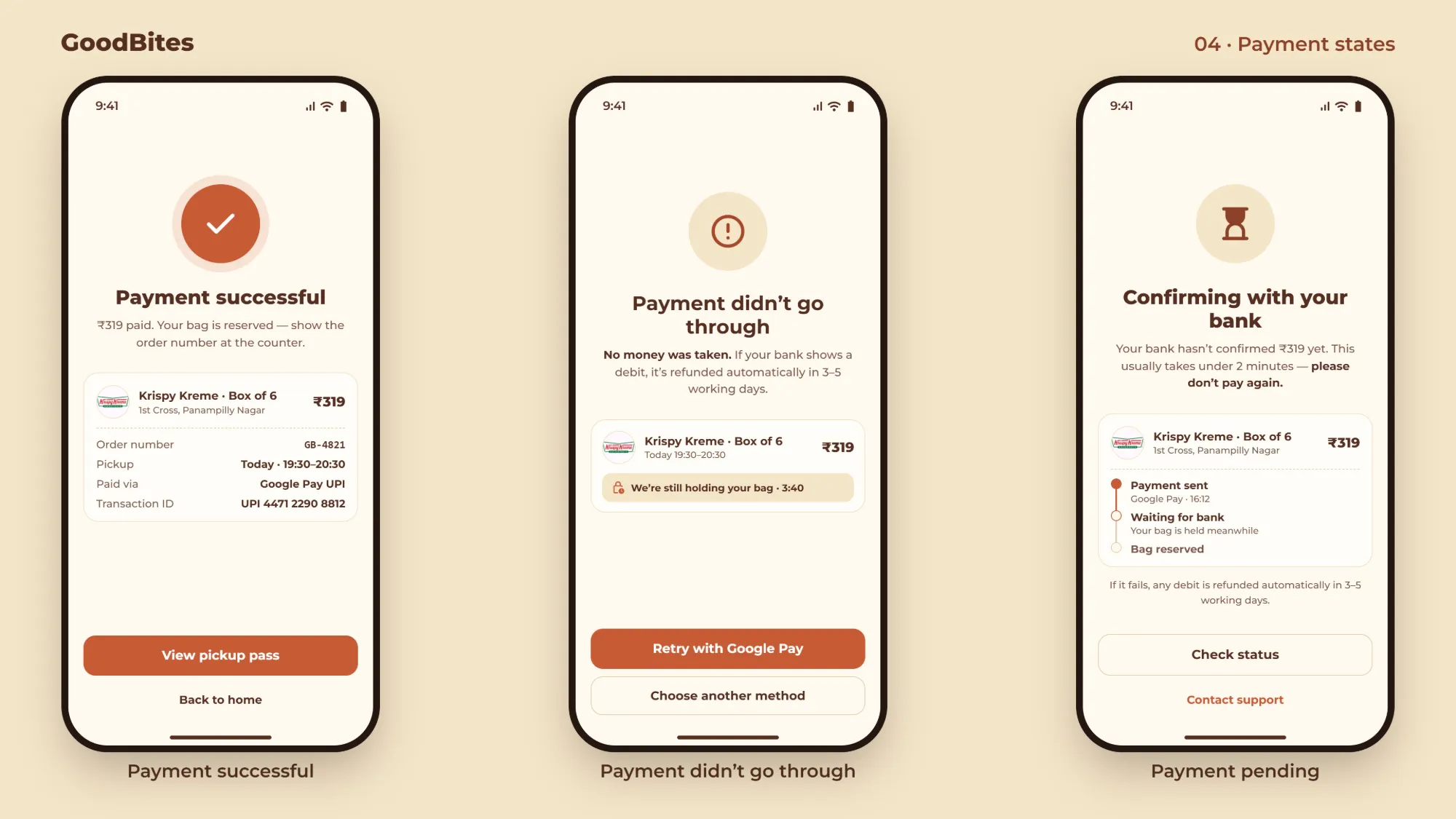
Every outcome says what happened to your money.
-
Successful
Order number, pickup and transaction ID in one receipt.
-
Didn't go through
"No money was taken" first, with the bag still on hold.
-
Pending
A step tracker and a clear "please don't pay again."
05
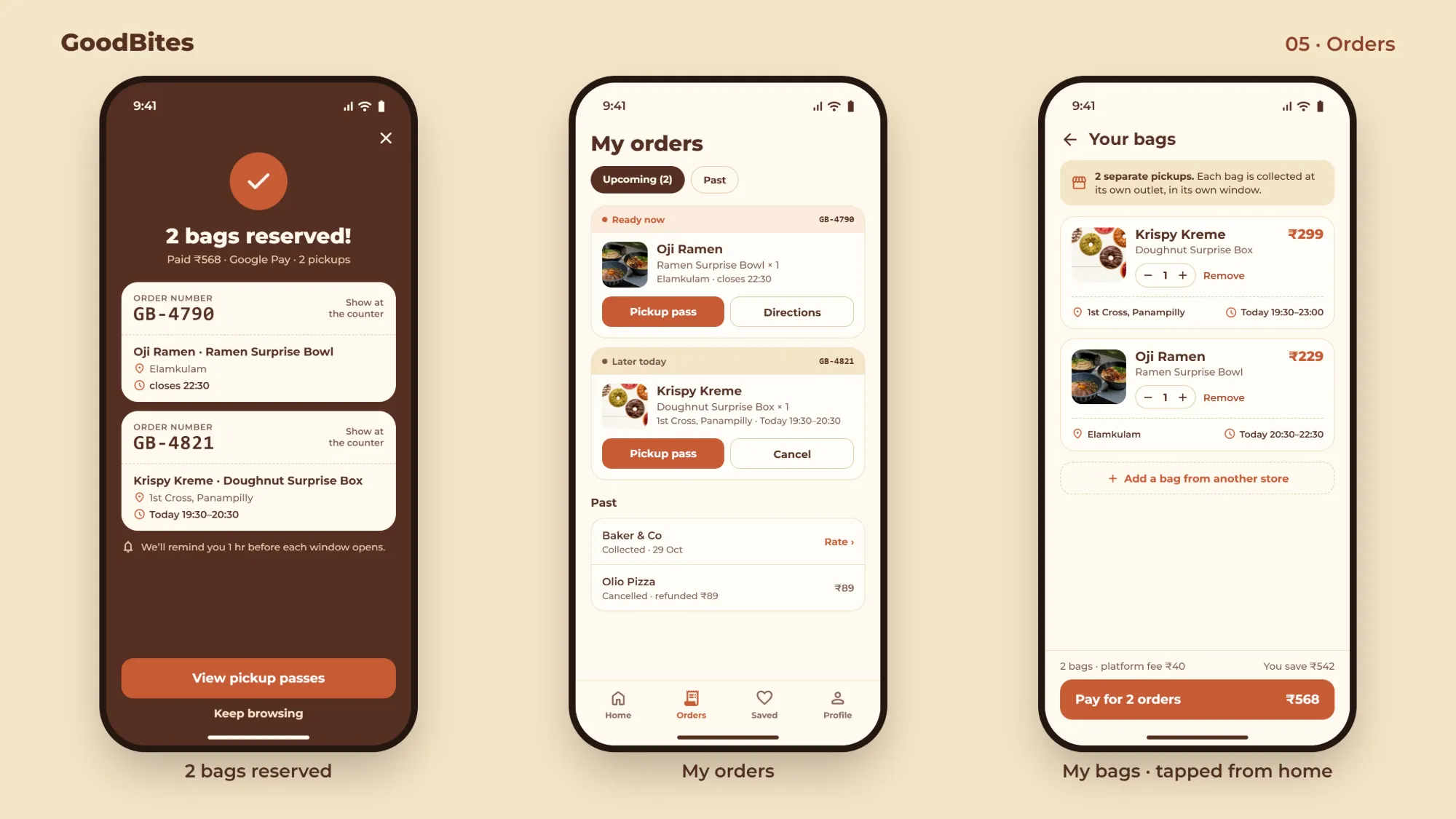
ORDERS
Bags from different stores, each with its own pickup.
-
2 bags reserved
One payment, two order numbers to show at each counter.
-
My orders
Ready now vs later today, with pickup pass and directions.
-
Your bags
Separate outlets and windows, shown before you pay.
06
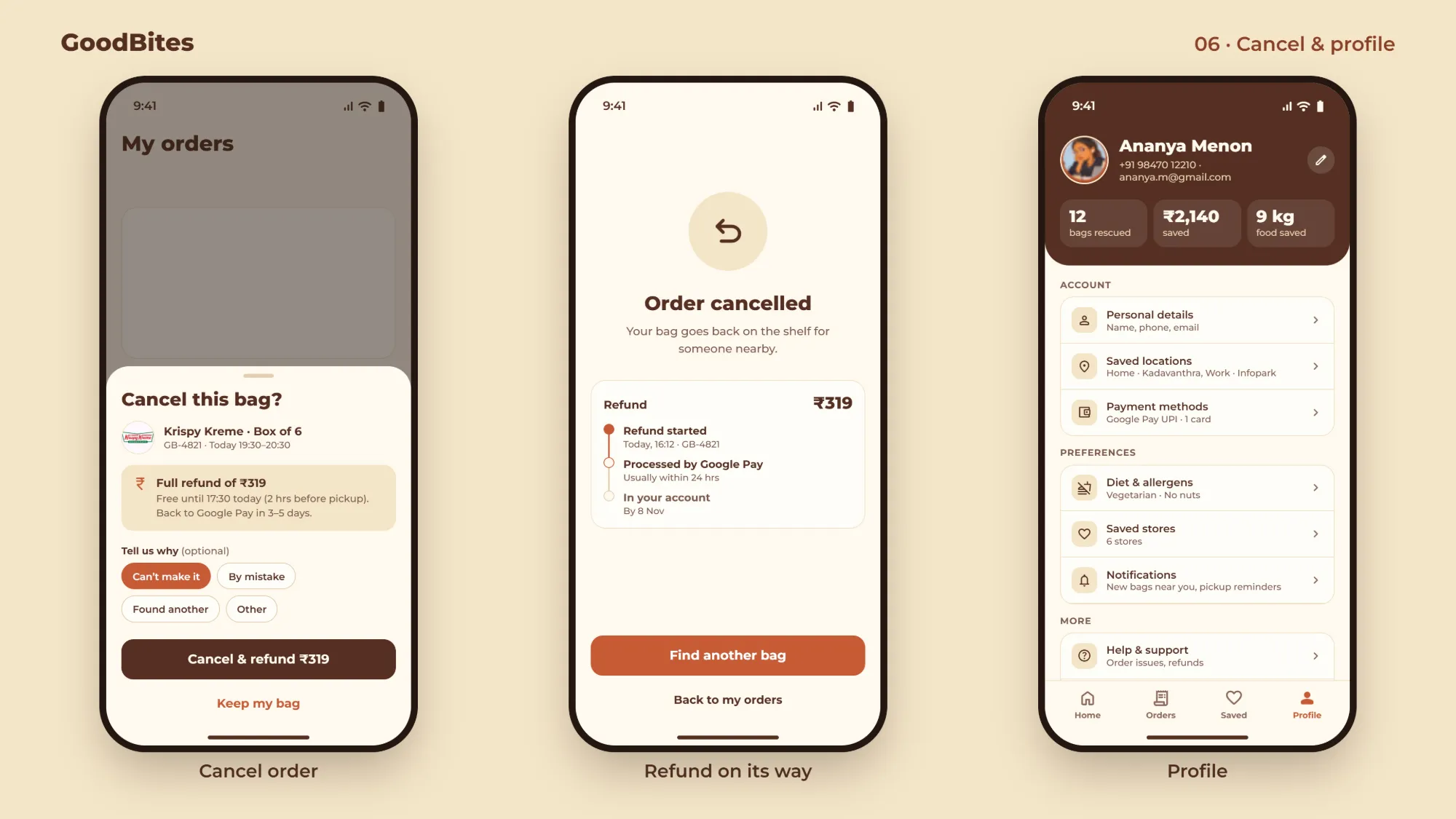
CANCEL & PROFILE
Changing plans should never feel like a penalty.
-
Cancel this bag
Free-cancellation deadline and refund amount before you confirm.
-
Refund on its way
A timeline from started to in your account, and the bag goes back on the shelf.
-
Profile
Bags rescued, money saved and food saved, alongside settings.
07 · NEW FEATURE
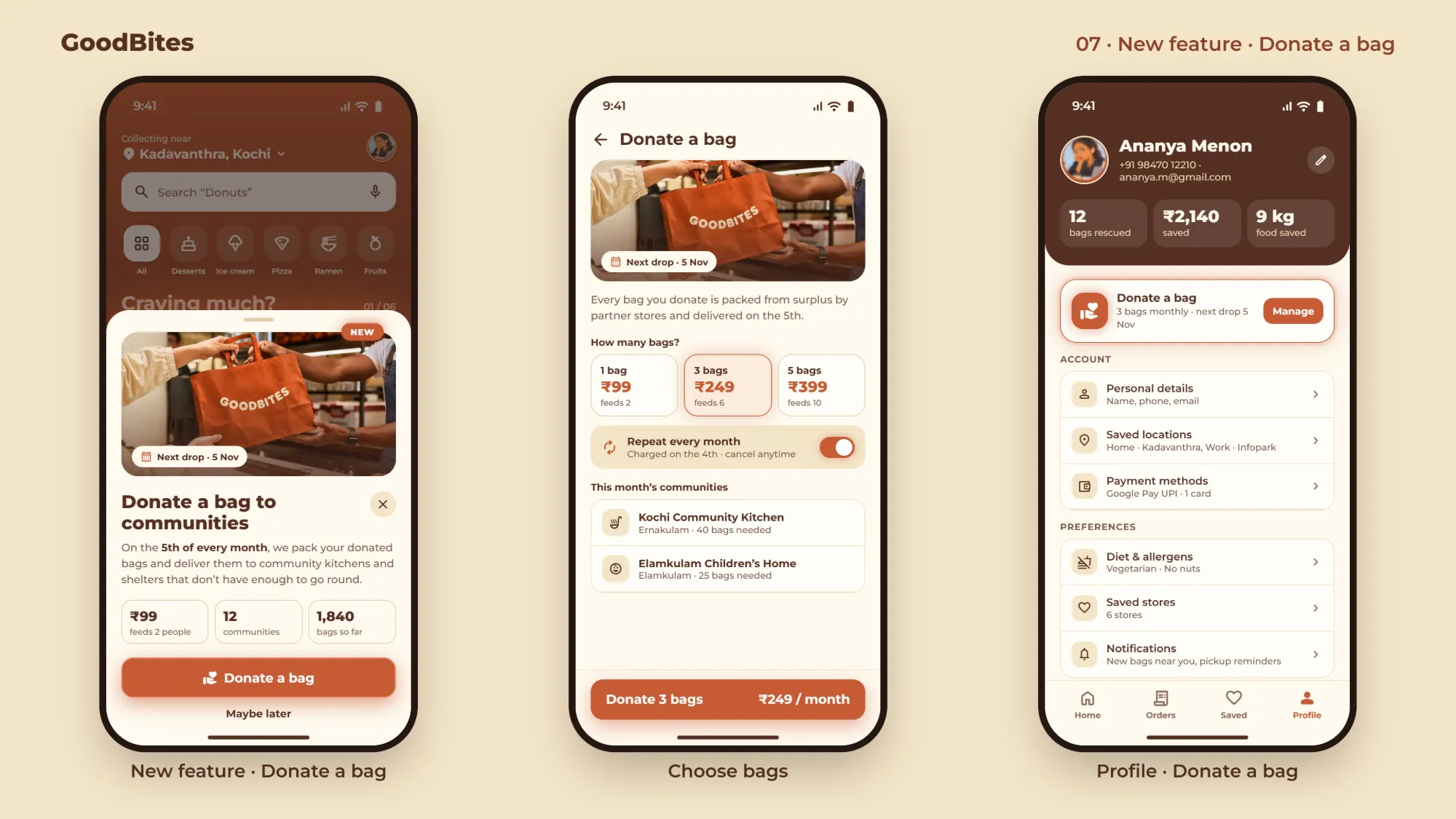
DONATE A BAG
Turning surplus into support for communities that need it.
-
A gentle prompt
Introduced on home as a dismissible card, never a blocker.
-
Choose bags
1, 3 or 5 bags a month, with how many people each one feeds.
-
Lives in profile
Manage your monthly donation alongside everything else.
OUTPUT
Less food wasted every night, and bags donated to communities every month.
Surplus that still finds a home
Donate a bag routes extra stock to community kitchens and shelters every month.
Impact you can see
Bags rescued and kg of food saved on the profile keep people coming back.